find_each, in_batches and insert_all, priced in queries
The first time a rake task kills a server, it's almost always a loop over every row of a table.
The fix is one method name, and there are three of them with genuinely different jobs. Here's what
each costs, measured over 2,500 rows on Rails 8.1.4 by counting real queries off
sql.active_record.
Reading: one query is the expensive one
Post.all.each { |p| p.title }               # 1 query
Post.find_each { |p| p.title }              # 3 queries
Post.find_each(batch_size: 500) { |p| p }   # 6 queries
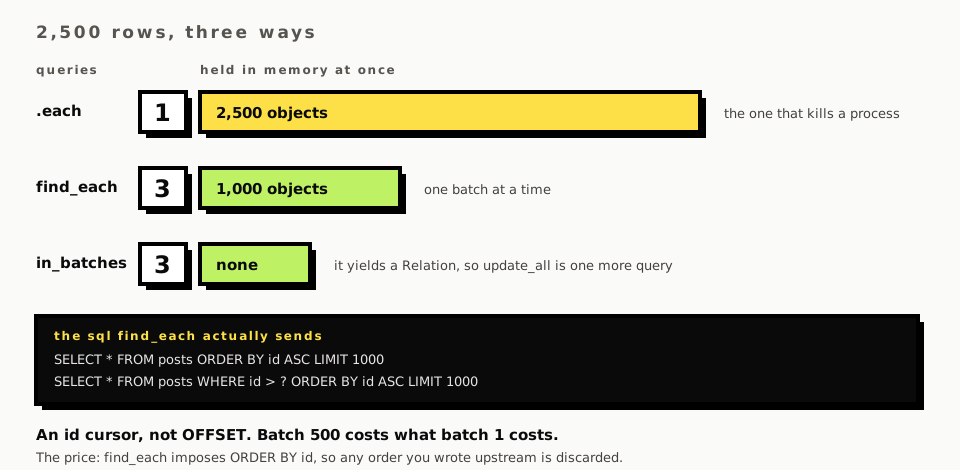
The counts are the opposite way round from what you want, and that's the point. Post.all.each
sends a single query and then holds 2,500 instantiated Active Record objects in memory at once.
On 2,500 rows that's fine. On two million it's the thing that gets your process killed, and the
query count was never the number to watch.
find_each trades queries for memory deliberately. Three queries for 2,500 rows at the default
batch size of 1,000: two that return rows and one that comes back empty and ends the loop.
It walks a cursor, not an offset
This is the detail that makes find_each safe on a big table, and it's worth seeing.
-- first batch
SELECT "posts".* FROM "posts" ORDER BY "posts"."id" ASC LIMIT 1000
-- every batch after
SELECT "posts".* FROM "posts" WHERE "posts"."id" > ? ORDER BY "posts"."id" ASC LIMIT 1000
No OFFSET anywhere. We checked.
A paginated version would say LIMIT 1000 OFFSET 1000000, and the database would walk and discard
a million rows to answer it, so batch one thousand costs a thousand times batch one. The id cursor
costs the same every time, because the index does the seeking.
It also means rows arriving while you iterate get picked up if their ids sort after your cursor, and rows you've already passed don't. For a background job over a live table that's usually the behaviour you want, and it's worth knowing you have it.
The cost of the cursor is that find_each overrides your order. It has to sort by id, so an
order(:created_at) you wrote upstream is silently discarded. If the order matters, find_each is
the wrong tool.
in_batches gives you a relation, which changes what you can do
find_each yields records one at a time. in_batches yields the batch, and it yields it as a
relation:
Post.in_batches(of: 1000) do |relation|
  relation.class                                   # => ActiveRecord::Relation
  relation.update_all(archived: true)              # 1 query for the whole batch
end
Nothing is instantiated. No callbacks run, no validations run, and 1,000 rows change in one
statement. For "set a flag on every matching row" that's exactly right, and it's the reason to
reach for in_batches over find_each when you're writing rather than reading.
The same shape works for delete_all and for pluck. If you need the records after all,
relation.each gets them, and then you're back to find_each with extra steps.
Writing: insert_all against the loop
Post.insert_all(rows)            # 500 rows, 1 query
rows.each { |r| Post.create!(r) } # 500 rows, 1000 queries
A thousand to one. The two queries per create! are the uniqueness validation's SELECT and
then the INSERT; drop the validation and it's one each, which is still 500.
What you give up is everything Active Record does for you. insert_all runs no validations, fires
no callbacks, and doesn't touch created_at or updated_at unless those keys are in your hashes.
We proved the first one by inserting a row with a nil title straight past a presence validation,
and it landed in the table.
So the honest framing isn't "insert_all is faster". It's that insert_all is a different
operation: it's SQL with a Ruby shape, and the record lifecycle isn't part of the deal. Use it for
data you've already validated or data you trust, like an import you've checked or a seed.
It returns an ActiveRecord::Result rather than records, which surprises people reaching for the
ids afterwards. insert_all(rows, returning: %w[id]) is the supported way to get them, and it's
one round trip instead of a reload.
The rule this collapses into
Four cases and they don't overlap much.
Reading a lot of rows one at a time: find_each. Changing a lot of rows the same way:
in_batches with update_all. Creating a lot of rows: insert_all. And each when you already
know the table is small, which is most of the time and is why the habit survives long enough to
hurt.
The one that gets missed is the second. Plenty of code uses find_each and then calls save! on
each record, which is the slow path wearing the fast method's name.
What this page doesn't cover
No memory numbers. The whole argument for find_each is resident memory and there's no
measurement of it here, because measuring Ruby's heap honestly takes more care than a query
counter and the result depends on your object graph rather than on Rails.
Nothing here touches find_in_batches, which yields arrays rather than relations and sits between
the two, nor the start: and finish: options that let you shard a batch job across processes.
And none of it ran against a table large enough for the cursor to matter: 2,500 rows is enough to
count queries and far too few to show you what OFFSET would have cost.
Comments
No comments yet. Be the first.