accepts_nested_attributes_for, and the children it throws away
A form that creates a survey and its questions in one post is the standard case for
accepts_nested_attributes_for, and the standard case works. What's worth knowing before you use
it is what it does when the input isn't perfect, because two of its defaults fail quietly and one
of them loses data.
Measured on Rails 8.1.4.
What the line actually gives you
class Survey < ApplicationRecord
  has_many :questions, dependent: :destroy
  accepts_nested_attributes_for :questions, allow_destroy: true, reject_if: :all_blank
end
That defines questions_attributes=, and that single writer is the whole mechanism. Your form
posts survey[questions_attributes][0][body], strong parameters permits it, Survey.new assigns
it, and the children come along on save.
The options are stored where you can read them, which is handy when you inherit a model and want to know what it's set to:
Survey.nested_attributes_options[:questions]
# => {allow_destroy: true, update_only: false, reject_if: #<Proc:... nested_attributes.rb:303>}
:all_blank isn't a symbol Rails checks for later, it's resolved to a lambda at declaration time.
The query cost is as good as it looks. Creating a survey with three questions sent 4 INSERTs and nothing else: one per row, no lookups, four queries in total.
The option that eats your data
reject_if: :all_blank exists to solve a real problem. A nested form renders empty rows for new
children, and without this option an untouched empty row becomes a validation error on a child the
user never filled in.
What it does in exchange:
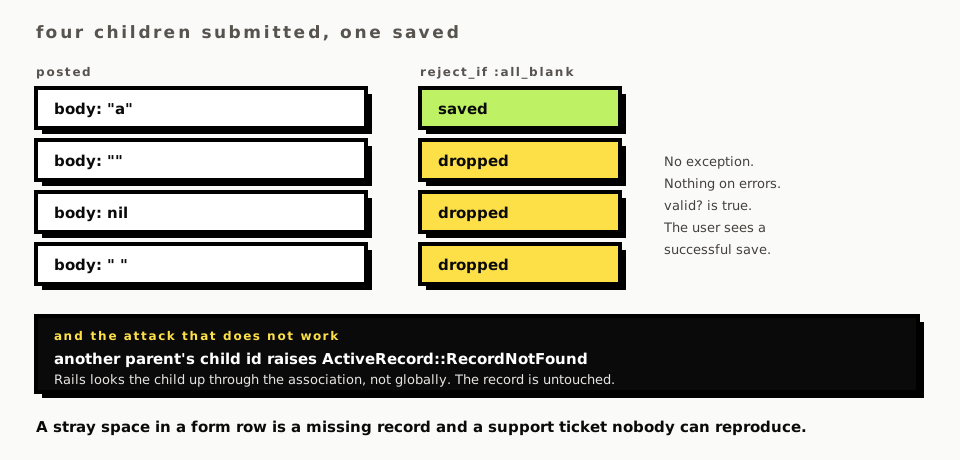
survey = Survey.create!(title: "s", questions_attributes: [{ body: "a" }, { body: "" }, { body: nil }])
survey.questions.count   # => 1
Three submitted, one saved. No exception, no validation error, nothing on survey.errors. The
other two were dropped before any validation ran, and nothing anywhere records that it happened.
It also treats whitespace as blank:
survey = Survey.new(title: "s", questions_attributes: [{ body: "ok" }, { body: " " }])
survey.valid?          # => true
survey.errors.first    # => nil
A user typed a space into a row, the form posted it, and that row is gone. They get a success page, and the thing they typed isn't there. That's a support ticket nobody can reproduce, because the space doesn't survive into anything you can look at afterwards.
The honest fix depends on which problem you actually have. If the empty rows come from your own
form rendering blanks, build them in the view instead and drop the option. If users genuinely
submit partial rows, a custom reject_if lambda that only skips rows where every field is nil
is narrower than :all_blank and won't eat a stray space.
_destroy, and the option it needs
survey.update!(questions_attributes: [{ id: question.id, _destroy: "1" }])
The child is gone, and the key is magic: _destroy is checked by name, and its value goes through
Rails' boolean cast, so "1", "true" and true all work while "0" and "false" don't.
Without allow_destroy: true the key is ignored entirely. Not an error, not a warning, just a
form with a delete checkbox that does nothing, which is a satisfying bug to find in a code review
and a miserable one to find in production.
The attack that doesn't work
The obvious worry about a nested form is the id field: it's in the markup, a user can change it,
and it decides which record gets updated. So what happens when somebody posts a child id that
belongs to somebody else's parent?
mine.update!(questions_attributes: [{ id: someone_elses_question.id, body: "hacked" }])
# ActiveRecord::RecordNotFound
Rails looks the child up through the association rather than globally, so an id outside that parent's children simply isn't found. The record is untouched and your controller gets an exception it can render as a 404.
That's the right default and it's worth knowing you have it, because the usual advice is to be
nervous about nested ids without ever saying what Rails already does. What you still own is
permitting :id and :_destroy in strong parameters, and deciding whether a 404 or a redirect is
the right answer for your form.
What this page doesn't cover
No view. Everything above is model-level, so fields_for, the child_index trick for adding rows
with JavaScript, and the Turbo or Stimulus controller that usually drives that are all out of
scope, and they're where most of the real work is.
Nothing here covers update_only for a has_one, limit: on the collection, or what happens
when a nested child fails validation while its siblings pass, which is where the error messages
get hard to render usefully. Nor the alternative shape, a form object with its own validations,
which is the thing to reach for once the nesting goes two levels deep.
Comments
No comments yet. Be the first.