Running Rails 8 without Redis
Rails 8 removed the usual reason a small application runs two datastores. Jobs, cache and WebSockets all have adapters that live in the database you already have, so running Rails without Redis is now a default you can just accept.
Mostly you should. But one of those defaults is load-bearing for correctness: on a stock install your rate limit counter is a row in the same table as your page fragments, and its first increment can go missing.
What the solid adapters replace
Three jobs usually go to Redis. Rails 8 ships an adapter for each, storing its data in your own relational database.
- Solid Queue is an Active Job backend. Queues, claimed executions and scheduled jobs become tables.
- Solid Cache is an
ActiveSupport::Cache::Store. Entries become rows keyed by a hash of the cache key. - Solid Cable is an Action Cable adapter using the database as the pubsub transport.
Turning all three on is three lines in two files.
# config/environments/production.rb
config.cache_store = :solid_cache_store
config.active_job.queue_adapter = :solid_queue

# config/cable.yml
production:
  adapter: solid_cable
Swapping one back for Redis later touches these lines and nothing else.
What a single database buys
The sharpest win is a failure mode that stops existing. A Redis configured without persistence loses every enqueued job on restart. That can't happen when the queue is a table inside a transactional database, and the restore that brings back the jobs table brings back the rows those jobs were about.
The cost is load your database didn't carry before. Cache reads, queue polling and cable broadcasts all land on the same connection pool as user queries, so one slow query that saturates the pool degrades three subsystems instead of one. Size the pool for the workers too, during the migration: three lines of config makes it look free.
Rails 8 rate limiting runs on your cache store
Here's the signature that starts the problem.
def rate_limit(to:, within:, by: -> { request.remote_ip },
               with: -> { raise TooManyRequests },
               store: cache_store, name: nil, scope: nil, **options)
store: defaults to cache_store, which resolves to config.action_controller.cache_store and
falls back to config.cache_store. If you set :solid_cache_store and never thought about it
again, your abuse counter is a row in PostgreSQL. Nobody decided that. It followed from two
defaults agreeing with each other.
The check we're chasing is small enough to quote whole.
cache_key = ["rate-limit", scope, name, by].compact.join(":")
count = store.increment(cache_key, 1, expires_in: within)
if count && count > to
Note count &&. If the store can't produce a number, the request sails through. A rate limiter
that fails open is a defensible design choice, and it's worth knowing you have one.
How Solid Cache increments a counter
Read, add, write back, inside one transaction. Here's the method we're after, and the branch it yields to.
# app/models/solid_cache/entry.rb
def lock_and_write(key, &block)
  transaction do
    without_query_cache do
      result = lock.where(key_hash: key_hash_for(key)).pick(:key, :value)
      new_value = block.call(result&.first == key ? result[1] : nil)
      write(key, new_value) if new_value
      new_value
    end
  end
end

# lib/solid_cache/store/api.rb
if entry && !entry.expired?
  ActiveSupport::Cache::Entry.new(amount + entry.value.to_i, ...)
elsif /\A\d+\z/.match?(value)
  ActiveSupport::Cache::Entry.new(amount + value.to_i, ...)
else
  ActiveSupport::Cache::Entry.new(amount, ...)
end
lock is SELECT ... FOR UPDATE in solid_cache 1.0.10, and a locking select is an implementation
detail a cache is entitled to change. When the row is there it's correct: the statement takes a row
lock, everyone else queues behind it, the read-modify-write serialises. For any key written once
that's the only path it takes.
An expired entry lands in the last branch and restarts at amount. So does a missing one. Those
two aren't the same case, and the difference is the rest of this article.
Why the first write of a key can be lost
SELECT ... FOR UPDATE locks rows that exist. A predicate matching nothing takes no lock, and
PostgreSQL won't stop another transaction from inserting a row that would have matched.
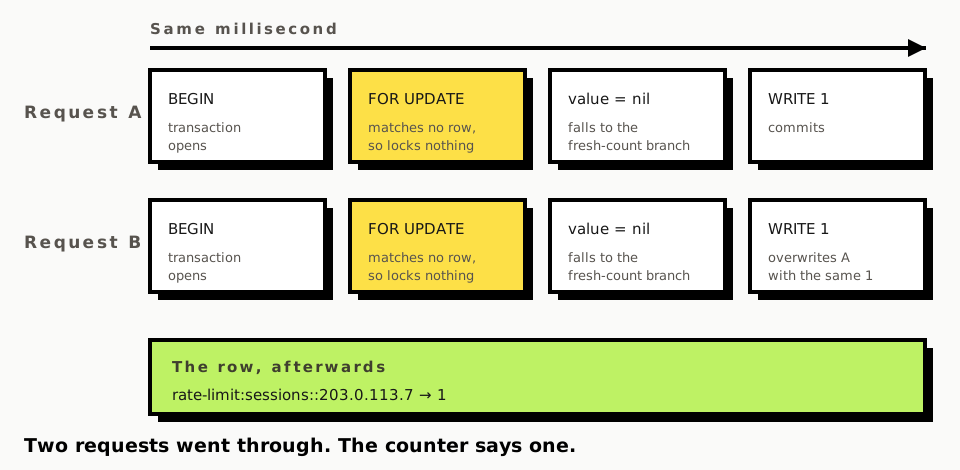
So neither blocks, both get nil, and whichever commits second overwrites the first with the same
number. Two requests happened. The counter says one.
For a cache this is a non-event. You lose a write on a cold key, take one extra miss, and
ActiveSupport::Cache never promised otherwise. It only becomes interesting when something treats
the store as a counter of record, which rate_limit does by default.
to: 10 admits eleven. Once per first-seen identifier, and the identifier is usually the IP, so
somebody rotating addresses meets this on every single one.
How long a rate limit row actually lives
Expiry in Solid Cache is a trimming pass, not a deletion the moment an entry goes stale. It runs
probabilistically on write and removes rows by age, count or size, default max_age two weeks. An
entry past its expires_in keeps its row until a pass reaches it.
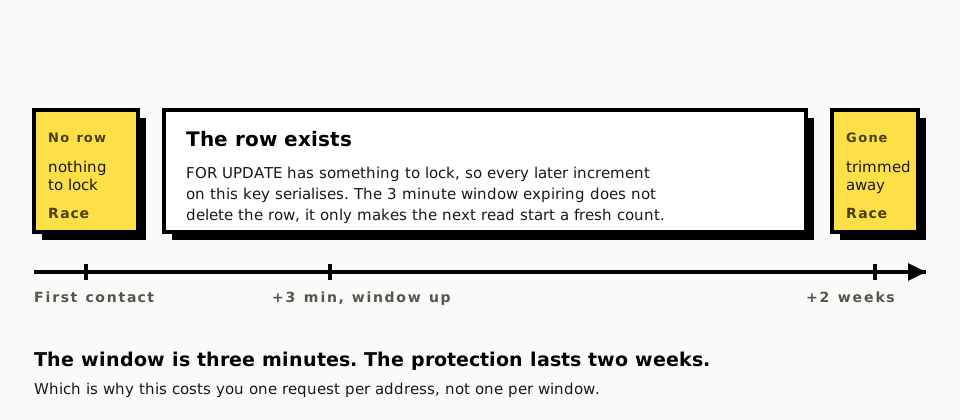
That flips the conclusion. The key for an address seen three minutes ago still has its row, so the locking select locks it and increments serialise properly. The lost increment is confined to keys with no row at all: a first-seen identifier, or one trimmed away after a long absence. Your exposure is first contact with each address, which is exactly when an unknown address matters.
Giving rate limits a store of their own
One constant, and rate_limit already documents the keyword.
class SessionsController < ApplicationController
  LIMIT_STORE = ActiveSupport::Cache::RedisCacheStore.new(url: ENV["RATE_LIMIT_REDIS_URL"])

  rate_limit to: 10, within: 3.minutes, store: LIMIT_STORE, only: :create
end
Any ActiveSupport::Cache::Store whose increment is atomic on an absent key will do, and a store
already in your deployment beats one added for a single counter.
The better reason to split them has nothing to do with atomicity. A cache store is sized and trimmed for cache data, so under memory pressure a busy application evicts fragments and your counters go with them, on the same rule. An evicted counter is a reset counter, which makes the retention of your abuse limits a side effect of how much page cache you happen to be holding.
If you keep one store, know which of your limits depend on the first increment being exact. A login limit standing between an attacker and a credential stuffing run isn't the same risk as a limit smoothing traffic to an expensive report.
When Redis earns its place back
Tens of thousands of jobs a minute put polling and claiming load on the database serving your user requests, where a dedicated queue backend stops competing for the connection pool. Hot keys at high throughput are the same argument from the other side, since an in-memory store answers a read with no round trip. Atomic counters are the third reason and arrive far earlier than either.
What this costs you to build yourself
Three lines got you here. Knowing which of them is safe to leave alone is the slow part, and rate limiting is only the example we've just pulled apart: there's also a connection pool sized for workers as well as web requests, and a cache whose eviction pressure shouldn't be deciding your security limits.
The Rails boilerplate this site sells runs the configuration at the top of this article, for the reasons above.
Comments 2 comments
Thanks for sharing!
Thanks for reading it, and both points are fair.
On the code: it's
SolidCache::Entry.lock_and_write, which doeslock.where(key_hash: ...).pick(...)inside a transaction. On a key that already exists that's correct, the row lock serialises everyone.The gap is the branch where no row exists yet: on PostgreSQL a locking select that matches no rows takes no lock, so two concurrent first increments both read
nil, both compute amount, and the upsert on the unique key_hash index means the second overwrites the first. I was reading solid_cache 1.0.10. I should have linked it instead of describing it, and I'll fix that in the post.On issues and PRs: I'd genuinely like to be pointed at prior discussion if you've seen any. I'm putting together a repro and a PR rather than just an issue, since the fix and the reproduction belong together.
I'll edit the post with the links once it's up.