Turbo frame: Content missing
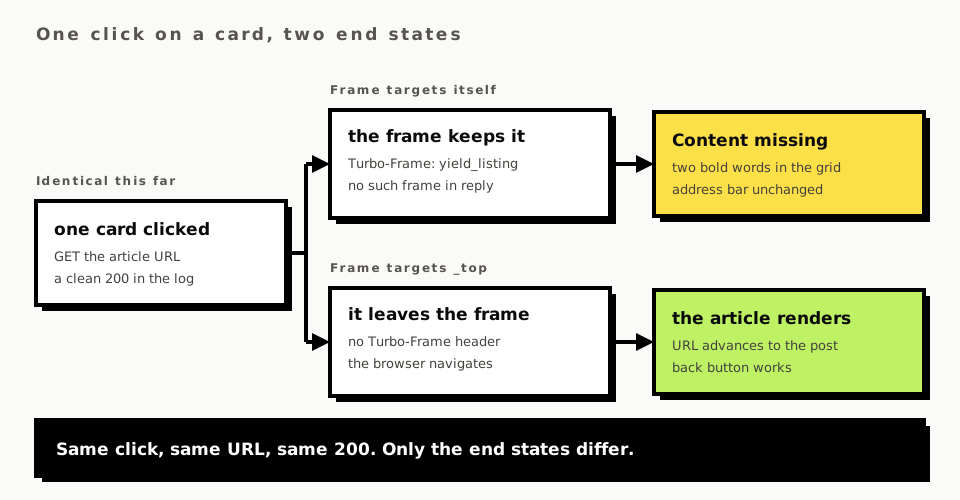
A link opens nothing. The address bar does not move, the page keeps its scroll position, and where the article should be there are two words in bold: Content missing. The Rails log shows a clean 200 for the page you wanted, which is the confusing part. The server did its job and the response was thrown on the floor.
Turbo threw it away because the request came from inside a <turbo-frame> and the response did not
contain a frame with the same id. That rule is the whole of it. What follows is the mechanism, the
production incident on this site that it caused, the shapes it arrives in, and the order to check
them in.
None of this is specific to this site. A Rails Turbo frame wrapping anything clickable does the same thing to every link inside it.
What a Turbo frame Content missing error actually is
turbo:frame-missing is a cancelable event Turbo dispatches on the frame element when a frame
request comes back without the frame. Everything below is turbo-rails 2.0.23, from the bundled
app/assets/javascripts/turbo.js.
Every frame-initiated request is tagged on the way out. FrameController#prepareRequest sets
request.headers["Turbo-Frame"] = frame.id, which is how the server knows and how you will know in
a minute. On the way back, #loadFrameResponse parses the HTML and calls
extractForeignFrameElement, which looks for exactly turbo-frame#<id> in the document body. If
that returns nothing, three things happen in order:
#willHandleFrameMissingFromResponse(fetchResponse) {
  this.element.setAttribute("complete", "");
  const response = fetchResponse.response;
  const visit = async (url, options) => { /* ... */ };
  const event = dispatch("turbo:frame-missing", {
    target: this.element,
    detail: { response: response, visit: visit },
    cancelable: true
  });
  return !event.defaultPrevented;
}
The frame is marked complete before anything else, so frame.loaded resolves and any
turbo-frame[complete] CSS you wrote thinks the navigation succeeded. Then the event goes out. If
nobody calls preventDefault, FrameView#missing runs and the entire contents of the frame become
one element:
missing() {
  this.element.innerHTML = `<strong class="turbo-frame-error">Content missing</strong>`;
}
and a TurboFrameMissingError is thrown with a message worth reading in full, because it contains
the id you are looking for:
The response (200) did not contain the expected <turbo-frame id="yield_listing">
and will be ignored. To perform a full page visit instead, set turbo-visit-control to reload.
Two absences matter. session.frameLoaded is never reached on this path, so turbo:frame-load does
not fire and cannot be used to detect the failure. And the throw happens inside the private async
method #loadFrameResponse, so it surfaces as an unhandled promise rejection rather than a
synchronous error, which decides whether your browser error reporting sees it at all.
To take it over, cancel the event and use the visit function handed to you in the detail:
addEventListener("turbo:frame-missing", (event) => {
  event.preventDefault()
  event.detail.visit(event.detail.response)
})
visit accepts either a URL or the Response object, and passing the response reuses the HTML
already fetched instead of asking for it twice.
Why Turbo stopped breaking out on its own
Older Turbo did what most people still expect: fire the event, and if nobody cancelled it, perform a full page visit to the requested URL. The pull request that removed it, hotwired/turbo#863, is titled "Don't break out of frames when frame missing" and shipped in v7.3.0 on 2023-03-01.
The reasoning is in the pull request and it holds up. "If the frame contents were non-critical,
reloading the page can turn a minor bug into a major one." A broken sidebar frame should not throw
away the form the user has half filled in. And the URL a frame requests is often a URL built to
serve that frame: "It leaves the user at a URL that may never be capable of rendering a valid
response." The old default also hid exactly the bug in this post, because a frame that was missing
by mistake and a frame deliberately escaped with target="_top" produced the same full page visit.
The position here: the loud failure is correct and the old behaviour is not worth wanting back. The cost is real, and the cost is that the error lives in the DOM. The server returned 200. Nothing reaches your error tracker unless its browser integration catches unhandled rejections. The failure is visible to the person using the page and to nobody else, which on this site meant it was found by looking rather than by being alerted.
Every article link on /yield was dead for a few hours
/yield has a filter with two labels, posts and videos, that swaps the grid of article cards without reloading the page. The obvious way to build that is to wrap the labels and the grid together in one frame, which is what shipped:
<%= turbo_frame_tag "yield_listing", data: { turbo_action: "advance" } do %>
The filter worked. Every card underneath it stopped working. A link inside a turbo-frame navigates
that frame by default, so each card asked /yield/solid-queue-vs-sidekiq for a frame with the id
yield_listing, and no article page has one. Turbo fired turbo:frame-missing and painted Content
missing over the grid. The URL did not change, so there was nothing to go back from and nothing in
the address bar to suggest what had happened.
Reproducing it in the browser settled what the server log could not. The turbo:frame-missing
event carried the article's own URL as the response it could not use: the fetch had succeeded, the
article HTML was sitting in event.detail.response, and Turbo discarded it because the one element
it needed was not in there. The page hero above the frame was never affected, because it sits
outside the frame and no request was made for it.
The fix is one attribute and a pair of opt-ins:
<%= turbo_frame_tag "yield_listing", target: "_top", data: { turbo_action: "advance" } do %>
  <%= link_to yield_articles_path(kind: (kind unless active)),
        data: { turbo_frame: "yield_listing" }, ... %>
Breaking out is now the default and the two filter labels opt back in by name. The whole point of arranging it that way round is the link nobody has written yet: a card gets an author byline or a tag link six months from now, and it works without anybody remembering this page.
The Turbo frame target attribute against data-turbo-frame on a link
Precedence between the two is one line, in FrameController#findFrameElement:
const id = getAttribute("data-turbo-frame", submitter, element) || this.element.getAttribute("target");
The element wins over the frame. data-turbo-frame is read from the submitter first, then the
element itself, and only if neither has it does Turbo fall back to the frame's target. So the two
attributes are not alternatives, they are a default and an override, and that is what decides which
way round to build.
Two arrangements, both legal:
- Frame targets itself, links opt out. Default for a frame whose links belong in it. A
paginated list is the honest case: the page links should navigate the frame and nothing else,
which is the argument in pagination without a gem. One link out
of ten wants
data-turbo-frame="_top"and gets it. - Frame targets
_top, links opt in. Default for a frame that happens to contain a lot of ordinary navigation, which is the /yield listing: two filter labels belong in the frame and every card does not.
Pick by counting. Whichever side is the majority becomes the default, because the failure mode is asymmetric: forgetting the opt-out gives you Content missing, which is loud, and forgetting the opt-in gives you a full page reload where you wanted a frame swap, which is quiet and looks fine.
The product this site sells has exactly one frame in it, and it went the other way for a good
reason. app/views/onboarding/show.html.erb wraps the onboarding step in onboarding_step, and
only the final step's form escapes:
<%# On the last step, break out of the frame so the completion redirect loads the dashboard
    as a full page. Otherwise Turbo looks for the onboarding_step frame in the dashboard
    response, doesn't find it, and shows "content missing". %>
<% step_form_data = { onboarding_target: "form", action: "submit->onboarding#submitting" }
   step_form_data[:turbo_frame] = "_top" if Onboarding::Flow.last?(@step) %>
Every step but the last renders another step into the same frame, so the frame is the default and one branch opts out. Note that this is a form rather than a link, and the same precedence applies through the submitter argument.
The other responses that answer without the frame
Four more ways to get the identical error, none of which involve a link inside a frame.
A redirect to a page that has no frame. Session expires, the frame request is redirected to
/users/sign_in, and the sign-in page has no <turbo-frame id="account_panel"> in it. Turbo
follows the redirect and then fails on the final document. The escape hatch is named in the error
message itself: a <meta name="turbo-visit-control" content="reload"> in the head of that response
makes Snapshot#isVisitable false, and #handleUnvisitableFrameResponse does a full page visit
instead, logging a console warning as it goes.
A 404 or a 500 rendered as an error page. requestFailedWithResponse calls the same
loadResponse as requestSucceededWithResponse, so a failed request with an HTML body takes the
identical path. Your public/500.html has no turbo-frame in it, so the reader sees Content missing
rather than your error page, and the status code in the thrown message is the only clue that
anything failed at all.
The turbo-rails layout swap. When the Turbo-Frame header is present, turbo-rails substitutes
its own minimal layout, turbo_rails/frame.html.erb, which is this in full:
<html>
  <head>
    <%= csrf_meta_tags %>
    <%= yield :head %>
  </head>
  <body>
    <%= yield %>
  </body>
</html>
A frame declared in application.html.erb rather than in the view, a flash container being the
usual one, is therefore in the full page and absent from every frame response. The page looks
correct on a normal load and fails on every frame navigation.
A frame rendered conditionally. <% if @account %> around a turbo_frame_tag means the
response is a 200 with correct-looking HTML and no frame in it. Same for an id built from a record,
where the frame is dom_id(@post) on one page and a literal string on the other.
If you are reaching for a frame because you want to update something outside it, the frame is the
wrong tool and no arrangement of target will fix that. A stream response addresses elements by id
anywhere on the page, and Turbo Stream actions covers what those are.
Check these three things, in this order
- Read the
Turbo-Framerequest header. In the Network panel, find the request, look at the request headers. Its value is the id Turbo is going to demand from the response, and half the time reading it is the whole diagnosis: you expected a page navigation and the header tells you the request was framed. In Rails the same value isrequest.headers["Turbo-Frame"], exposed asturbo_frame_request_idandturbo_frame_request?byTurbo::Frames::FrameRequest. - Search the response body for that id. The response tab, not the Elements panel, which shows you the document after Turbo has already given up. Check the status code and whether the request redirected while you are there. If the id is absent, you now know whether the cause is a redirect, an error page, the layout swap, or a conditional.
- If the id is genuinely absent on purpose, ask why the request was framed at all. A response
that will never contain that frame means the request should not have been a frame request. Find
the element that started it, walk up to its enclosing
<turbo-frame>, and decide which way round that frame'stargetshould be. That decision, not a handler forturbo:frame-missing, is the fix.
Reach for an event handler only after those three. Cancelling turbo:frame-missing globally and
visiting the response turns every one of the causes above back into a silent full page reload,
which is the behaviour v7.3.0 removed and for the reasons it removed it.
There is no missing attribute on a turbo-frame
People go looking for a missing attribute, and turbo-frame does not have one. The element
reference lists src, loading, busy, disabled, complete, target and autoscroll, and
nothing named missing.
In turbo.js the word is the FrameView#missing() method and the turbo:frame-missing event name,
neither of which is an attribute you can set.
What you do have is the class on the markup Turbo injects, turbo-frame-error, which is a real
styling hook and which almost nobody uses. Styling it is the cheapest improvement available here:
the default string is two words in whatever font the frame inherits, and a reader has no idea
whether it means an outage or an empty list.
The request spec that stays green while every link is dead
/yield had a passing spec for this frame the entire time it was broken:
frame = response.body[/<turbo-frame[^>]*>/]
expect(frame).to include(%(id="yield_listing"))
expect(frame).to include(%(data-turbo-action="advance"))
Nothing about that is wrong and nothing about it could have caught this. Turbo's JavaScript never runs in a request spec, so the behaviour that failed, a link inheriting its enclosing frame, has no representation in the test at all. The test asserts the frame exists. The bug was what the frame did to its children.
There is no clever fix. Either you drive a real browser, which for one attribute is a poor trade, or you assert the attribute itself and accept that you are pinning a decision rather than testing a behaviour. The spec now does the second thing, and pins both halves, because fixing one and dropping the other trades a dead grid for a filter that reloads the page:
expect(frame).to include(%(target="_top"))
expect(filter_labels(response.body)).to all(include(%(data-turbo-frame="yield_listing")))
What this post does not cover
Turbo Streams are out of scope above except as the alternative tool, and stream messages have their
own missing-target failures with different error strings, action attribute is missing and
target or targets attribute is missing, raised from different code.
Also absent: lazy frames with loading="lazy" and a src, where the same error appears with no
click to blame it on; refresh="morph" and page refreshes, which take the
MorphingFrameRenderer branch; and the Turbo Native adapters, which nothing here runs.
Comments
No comments yet. Be the first.