Deploying Rails with Kamal 2
Rails 8 generates a config/deploy.yml, a Dockerfile and a .kamal/secrets file whether you
asked for them or not. In the boilerplate this site sells, all three are close enough to what Rails
generated that a diff against the railties template fits on one screen. The interesting part of a
Kamal deploy is not the YAML. It is the four or five values in that YAML that are still placeholders,
and one health check that has to answer 200 before your new container sees a single request.
What Kamal is, and what Kamal 2 replaced
Kamal is a gem that builds a Docker image, pushes it to a registry, opens an SSH connection to your
servers, pulls the image there and boots a container. Nothing is installed on the server to make
this work beyond Docker itself. The version in the boilerplate's Gemfile.lock is kamal (2.12.0).
Kamal 1 used Traefik to route requests to the running container. Kamal 2 replaced it with
kamal-proxy, a small Go reverse proxy Basecamp wrote for
this one job, running on ports 80 and 443 in its own container and forwarding to yours. The same
upgrade changed the default application port from 3000 to 80 and moved secrets out of .env into
.kamal/secrets. Kamal was called MRSK until a trademark
claim forced the rename in August 2023, which is why so much of the writing about it still says
MRSK.
"Deploy anywhere there is a Linux box with Docker" is the pitch, and the box is the part you already have. What you need to deploy Rails with Kamal is four more things:
- A registry both your laptop and the server can reach.
Kamal::Configuration#repositoryis[ registry.server, image ].compact.join("/"), so the image name is built from two lines of config and nothing else. - SSH access as a user that can talk to the Docker daemon.
Kamal::Configuration::Ssh#userisssh_config.fetch("user", "root"), and the boilerplate leaves thessh:block commented, so the default is root. - Secrets that resolve at deploy time.
.kamal/secretsis a shell-ish file evaluated on your machine, and the only uncommented line in the boilerplate's copy isRAILS_MASTER_KEY=$(cat config/master.key). - A URL that answers 200. More on that below, because it is the part that decides whether a deploy is considered to have worked.
The image tag is the git revision. When your working tree is dirty, Kamal appends
_uncommitted_#{SecureRandom.hex(8)} to it, which means a deploy from a dirty tree is still
reproducible enough to identify but will never match a commit you can check out.
Thruster, the proxy inside the container
Thruster is the second proxy in this stack, and it runs inside the image rather than on the host.
The last two lines of the boilerplate's Dockerfile are the whole story:
EXPOSE 80
CMD ["./bin/thrust", "./bin/rails", "server"]
thruster (0.1.26) wraps the Puma process so a container needs no process manager. It sets PORT
to TARGET_PORT (default 3000) before starting Puma, and listens itself on HTTP_PORT (default
80). That default is what makes EXPOSE 80 line up with kamal-proxy's app_port, which
Kamal::Configuration::Proxy#app_port reads as proxy_config.fetch("app_port", 80).
What Thruster adds on top of Puma is HTTP/2, X-Sendfile support, gzip with 32 bytes of random
jitter as BREACH mitigation, and an HTTP cache for public assets sized CACHE_SIZE (64MB) with a
MAX_CACHE_ITEM_SIZE of 1MB. It also does automatic Let's Encrypt certificates, but only when
TLS_DOMAIN is set, and under Kamal you do not set it: kamal-proxy terminates TLS on the host.
Thruster's FORWARD_HEADERS is "disabled when running with TLS; enabled otherwise", so with
TLS_DOMAIN unset it forwards X-Forwarded-* through to Puma, which is what you want.
Two proxies for one Rails app sounds like one too many. The split is real though: kamal-proxy owns routing, certificates and draining across deploys, and knows nothing about your assets. Thruster owns compression, static files and the asset cache, and knows nothing about deploys. The cost is an extra hop on every request and a second place to look when a response header is wrong.
What the shipped deploy.yml says, and what is still a placeholder
The boilerplate's config/deploy.yml is the Rails 8.1 template with three substitutions: service
and image are launchkit, the volume is launchkit_storage:/rails/storage, and a commented
example reads RUBY_VERSION: ruby-4.0.5. Once the template's ERB branches are resolved, that is the
entire difference. Saying so matters, because two of the values you will read there are not
configuration, they are the generator's filler:
servers:
  web:
    - 192.168.0.1

registry:
  server: localhost:5555
192.168.0.1 is a private-range address, usually a home router. localhost:5555 is a registry
running on the machine itself, and you are expected to replace
with ghcr.io or similar, and leaving it means repository evaluates to
localhost:5555/launchkit. The proxy: block is commented out in full, so out of the box there is
no host and no SSL, and the boilerplate's own documentation page starts by telling you to uncomment
proxy.ssl and proxy.host.
Three things in that file are not filler. env.clear sets SOLID_QUEUE_IN_PUMA: true, which runs
the Solid Queue supervisor inside the web Puma instead of on a second machine. The aliases block
gives you console, shell, logs and dbc. And volumes mounts a named Docker volume at
/rails/storage, which with config.active_storage.service = :local and storage.yml's
root: Rails.root.join("storage") means that volume is where every user upload lives.
Take that seriously before your first customer uploads anything. A named volume on one box survives
container replacement and nothing else: not a rebuilt server, not a provider incident, not docker
volume rm. The line in the file that says "Recommended to change this to a mounted volume path that
is backed up off server" is doing real work, and the alternative is switching Active Storage to S3
and deleting the volume.
The first deploy against a bare server
kamal setup is kamal deploy with two things in front of it. Its implementation invokes
kamal:cli:server:bootstrap and then deploy(boot_accessories: true), so it installs Docker and
boots accessories once, and every deploy after that is kamal deploy.
Bootstrap checks whether Docker is installed on each host and, if not, tries to install it, adding the SSH user to the docker group. When it cannot, the error is specific and worth recognising:
Docker is not installed on <host> and can't be automatically installed without having
root access and either `wget` or `curl`. Install Docker manually: ...
Now the part that catches people. .kamal/hooks in the boilerplate contains nine files, and every
one of them ends in .sample: pre-deploy.sample, pre-connect.sample, post-deploy.sample and
the rest. Kamal::Commands::Hook#hook_file is File.join(config.hooks_path, hook) with the bare
hook name, so nothing in that directory runs until you copy a file to the name without the
extension and make it executable. The pre-deploy.sample is a 122-line Ruby script that blocks the
deploy until the GitHub combined status for the current SHA is success, waiting up to 720
seconds. It is a genuinely good gate, and on a fresh checkout it is off.
Where the four databases go
Production database.yml in the boilerplate declares four connections, not one: primary, cache,
queue and cable, the last three inheriting from primary with their own database name and
migrations_paths. Host and credentials come from DATABASE_HOST, DATABASE_PORT,
DATABASE_USERNAME and LAUNCHKIT_DATABASE_PASSWORD. The boilerplate's documentation page offers
two homes for them: a Kamal accessory running postgres:17 on the same host with
directories: data:/var/lib/postgresql/data and DATABASE_HOST: launchkit-db, or a managed
database with DATABASE_HOST pointed at it and no accessory at all.
Nothing in the deploy runs migrations. The container does, on boot:
#!/bin/bash -e
if [ "${@: -2:1}" == "./bin/rails" ] && [ "${@: -1:1}" == "server" ]; then
  ./bin/rails db:prepare db:load_solid_schemas
fi
Stock Rails generates that file with db:prepare alone. The second task is the boilerplate's, and
it exists because of a failure that only appears on single-database deploys. When every entry in
database.yml resolves to the same database, db:prepare sets up primary and then skips cache
and cable because it sees a database that is already set up. solid_cache_entries and
solid_cable_messages are never created, and the first cache write or Action Cable broadcast raises
relation does not exist in production. db:load_solid_schemas loads db/cache_schema.rb and
db/cable_schema.rb into the primary connection, but only when the config genuinely shares the
primary's database and host and the table is missing.
On the four-database Kamal layout above the task has nothing to do and says so:
[db:load_solid_schemas] cache has its own database (launchkit_production_cache) - db:prepare
manages it; skipping.
Which database layout you get, and what each of those four connections is
actually for, is the subject of
running Rails 8 without Redis.
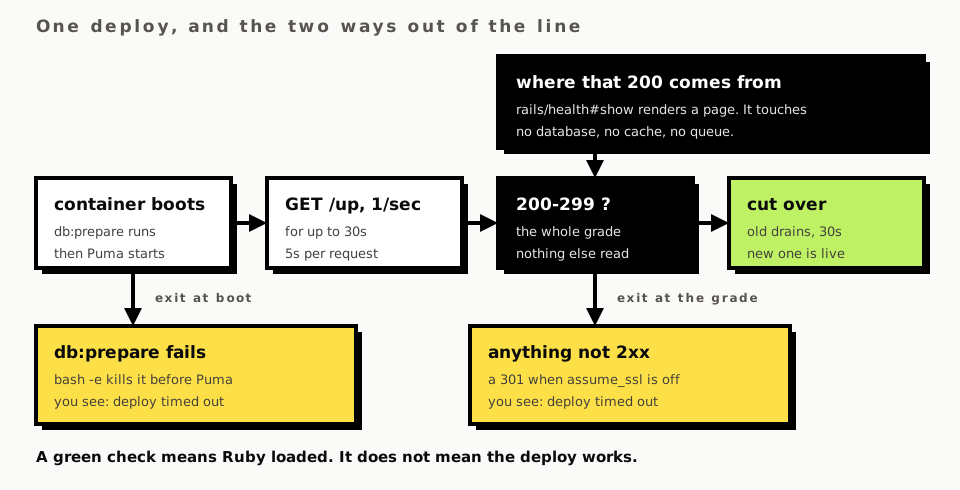
The -e on the first line of that script is load-bearing in an unhelpful direction. A db:prepare
that fails kills the container before Puma starts, the health check never gets an answer, and what
you see on your terminal is a deploy timing out. The actual Postgres error is in kamal app logs,
not in the deploy output.
What the health check has to answer
kamal-proxy decides whether your new container gets traffic, and it decides with one GET. From
Kamal's own documentation for the proxy block: "When deploying, the proxy will by default hit
/up once every second until we hit the deploy timeout, with a 5-second timeout for each request."
The grading is narrow, and it is one line of health_check.go:
if resp.StatusCode < 200 || resp.StatusCode > 299 {
    hc.reportResult(false, fmt.Errorf("%w (%d)", ErrorHealthCheckUnexpectedStatus, resp.StatusCode))
    return
}
The timers around it all default to numbers you can read in Kamal::Configuration:
deploy_timeout 30, drain_timeout 30, readiness_delay 7. Only the first two apply to a web
role. readiness_delay is documented as applying "to containers that do not run a proxy or specify
a healthcheck", which in this configuration means the commented-out job role and nothing else.
Zero downtime falls out of those two numbers: the proxy keeps sending requests to the old container
until the new one passes a check, then cuts over and drains the old one for up to drain_timeout.
Here is the part that stays green while production is broken. The route is
get "up" => "rails/health#show", and Rails::HealthController is rescue_from(Exception) {
render_down } wrapped around an action whose entire body renders a green HTML page. It touches no
database, no cache and no queue. Rails says so itself in the class documentation: "This endpoint
does not reflect the status of all of your application's dependencies, such as the database or Redis
cluster." A container with Postgres refusing every connection answers /up with 200, kamal-proxy
declares the deploy healthy and sends it live traffic.
What saves the boilerplate here is the entrypoint, not the health check: a database the app cannot
reach fails db:prepare and the container never boots. That covers the database being down at boot
time. It covers nothing that breaks afterwards, and if you want /up to mean more than "Ruby
loaded", you have to write your own controller action and accept the consequence Rails warns about
in the same paragraph, which is that a flaky third-party check becomes a restart loop.
Letting /up through force_ssl
One line in config/environments/production.rb exists only for that health check:
config.ssl_options = {
  hsts: { expires: 1.year, subdomains: true, preload: false },
  # Let load balancers hit the health check over plain HTTP (no redirect).
  redirect: { exclude: ->(request) { request.path == "/up" } }
}
Rails ships that exclude lambda commented out. Turning it on has a cost the middleware documents
and most people miss: ActionDispatch::SSL runs
flag_cookies_as_secure! headers if @secure_cookies && !@exclude.call(request), so an excluded path
also stops getting the secure flag on any cookie it sets. /up sets no cookies, so the exclusion
is free exactly where it is used. Widen that lambda to a prefix that covers something setting a
session and you have quietly turned off secure cookies on it.
Two failures that do not look like their cause
The first one arrives the day you turn on TLS. Uncomment proxy.ssl and proxy.host, leave
config.assume_ssl off, keep config.force_ssl = true, and ActionDispatch::SSL sees a plain HTTP
request on the container port and answers 301. kamal-proxy grades only 200-299, and its check calls
http.DefaultClient.Do(req), which follows redirects, so the request either fails on status or
walks back out to your public hostname and grades something that is not the container being
deployed. Both outcomes reach you as a deploy that timed out. The boilerplate sets
config.assume_ssl = true and config.force_ssl = true together, and ActionDispatch::AssumeSSL
is four lines that stamp HTTPS=on and rack.url_scheme=https onto every request, which is why
the redirect never fires and why removing one of those two flags without the other is how you get
here.
The second is a single truthy string. config/puma.rb line 38 reads:
plugin :solid_queue if ENV["SOLID_QUEUE_IN_PUMA"]
Presence, not value. Setting SOLID_QUEUE_IN_PUMA: false under env.clear in deploy.yml puts the
string "false" in the environment, "false" is truthy in Ruby, and the supervisor starts anyway.
To move jobs to a dedicated machine you delete the line from deploy.yml and uncomment the job
role with cmd: bin/jobs.
Rolling back needs a version
kamal rollback in 2.12.0 is declared desc "rollback [VERSION]", "Rollback app to VERSION" and
implemented as def rollback(version). The argument is required. Typing kamal rollback on its own
gets you a Thor argument error, not the previous release, and the boilerplate's documentation page
lists it bare with the comment "roll back to the previous release", which will not do what it says.
The versions you can pass are the git revisions Kamal tagged, listed by kamal app containers, and
Kamal refuses a version whose container is not on the host: "The app version '...' is not available
as a container (use 'kamal app containers' for available versions)".
Rollback runs the pre-deploy hook (the sample script exits 0 immediately when
ENV["KAMAL_COMMAND"] == "rollback", so a CI gate does not block an emergency), boots the old
image, and runs post-deploy.
What it does not do is the database. Booting the old image re-runs db:prepare, which is a no-op
against schema that is already there, so a migration that dropped a column an hour ago stays
dropped and the old code is now running against a table it does not expect. kamal rollback is a
code rollback. Deploys that change schema need the migration to be safe on its own, in both
directions, before the deploy goes out.
What this page does not cover
The site you are reading runs on Heroku, not Kamal. Everything above is read out of the shipped
config/deploy.yml, Dockerfile, bin/docker-entrypoint and config/environments/production.rb,
out of the kamal 2.12.0 and thruster 0.1.26 gems, out of kamal-proxy's source, and out of the
product's own deploy-kamal.md. There are no operational war stories here because there is no
Kamal production deployment behind it, and the sections above are deliberately about what the
configuration says rather than what a 3am page felt like.
Also out of scope: more than one web server, which changes TLS termination and rules out the
Let's Encrypt path in proxy.ssl; backing up a Postgres accessory, which Kamal does not do for you;
registry authentication past naming KAMAL_REGISTRY_PASSWORD in .kamal/secrets; and kamal-proxy's
metrics_port and anything downstream of it.
Comments
No comments yet. Be the first.